

Why use react-native-device-info?
Knowing more information about a device enables you to:- Fine-tune your app’s functionality
- Improve performance
- Provide a better user experience
Troubleshooting and logging
Knowing the device model, OS version, and first install time can help you address environment-specific issues, crashes, or bugs when you’re debugging and maintaining apps.User personalization
Knowing about the first install time, app version, or other device-specific features can be used to personalize the user experience. For example, you can show a welcome message for first-time users or offer different content for specific TV models.Installation
-
To use the package, add the JavaScript library dependency in your app’s
package.jsonfile. -
Import the components for whose methods you want to use.
For example:
How to use react-native-device-info in Vega
There are three types of methods available:- Synchronous: Use it when you need a value immediately without waiting for a promise. For example, running logic before your app renders or initializing a global configuration.
- Asynchronous: Use it when you want to avoid blocking the JavaScript thread. The value requires file I/O work or the library only exposes the method as async.
- Hooks: Use it when you’re inside a functional component.
Synchronous
For debugging and logging, synchronous methods get information on model, base OS, device type, app name, and application for your project. Here are some examples of how to retrieve user personalization components, synchronously.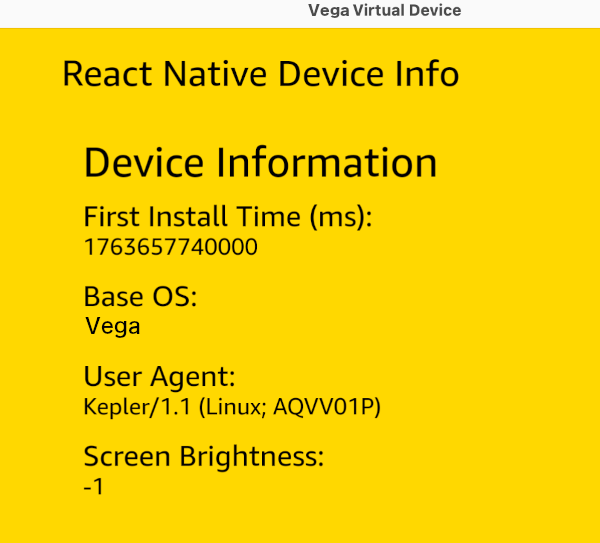
Example 2
For debugging and logging, synchronous methods get information on model, base OS, device type, app name, and application for your project. You can also use these same methods asynchronously.Asynchronous
For debugging and logging, asynchronous methods get information on model, base OS, device type, app name, and application for your project. You can also use these same methods synchronously without async / await.Example
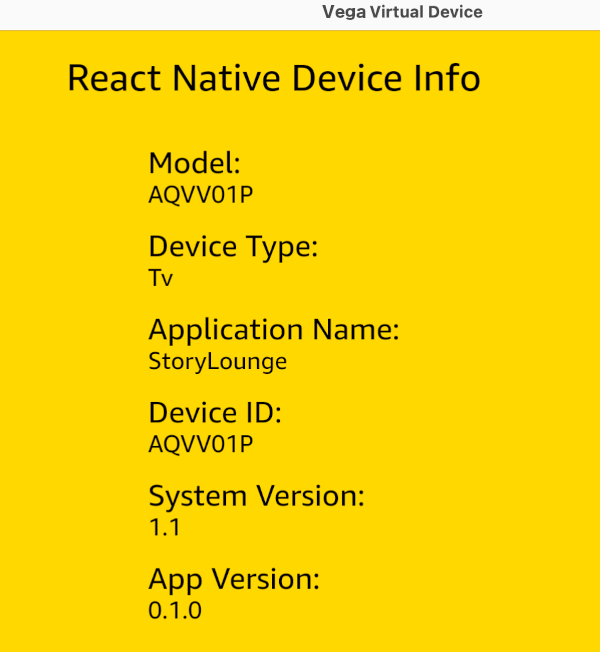
Hooks
- useBrightness()
- useManufacturer()
- useDeviceName()
- useFirstInstallTime()
useDeviceName().
- Location
- Memory
API reference
Vega only supports the APIs mentioned in this document. Many APIs from react-native-device-info APIs are environment-specific. If there’s no implementation for an environment, the default return values areunknown for string, -1 for number, and false for Boolean. Arrays and objects are empty ([] and {} respectively).
Most of the APIs return a promise but also have a corresponding API with Sync on the end that operates synchronously. For example, you might prefer to call getBaseOsSync() during your app bootstrap to avoid async calls during the first parts of app startup.
getBaseOs()
Gets the base OS build the product is based on.getFirstInstallTime()
Gets the time in milliseconds when the app was first installed.getInstallerPackageName()
The internal value used by the underlying source control to represent this build.getManufacturer()
Gets the device manufacturer.getLastUpdateTime()
Gets the time in milliseconds when the app was last updated.getUserAgent()
Gets the device User Agent.Known issues
getuserAgent might not return a value in the Vega Virtual Device, but returns a value on the Fire TV Stick.
getApplicationName()
Gets the application name.getVersion()
Gets the application version.getModel()
Gets the device model.getSystemName()
Gets the device OS name.getSystemVersion()
Gets the device OS version.getBundleId()
Gets the application bundle identifier.getDeviceType()
Returns the device type as a string.getDeviceId()
Gets the device ID.Supported versions
Related topics
- Supported Third-Party Libraries and Services
- react-native-localize — To retrieve locale-specific information such as country, timezone, and language preferences, use the
react-native-localizepackage alongsidereact-native-device-info.
