

Prerequisites
- Install Visual Studio Code.
- Install Vega Studio extension (0.21 or later)
Steps to debug your Vega Web App
- Open your app with Vega Studio.
- Build a debug variant and launch it.
-
Launch your app one of these two ways.
- Launch from command line.
- Tap the Play button on the Vega Studio side bar.
-
Launch Chrome DevTools from Vega Studio
-
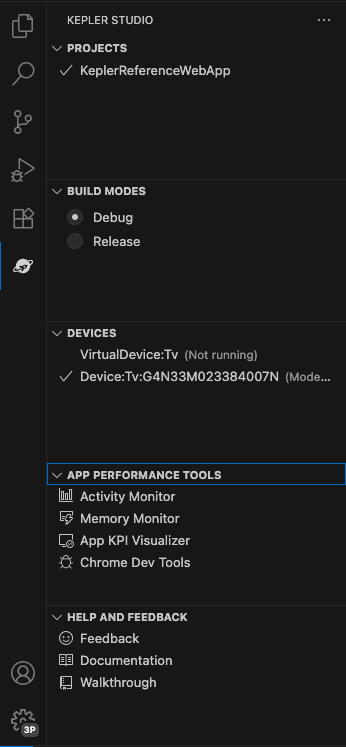
Open the Vega Studio side bar and click “Chrome DevTools.”
-
Notice the combo box to select the target runtime. Select WebView to debug HTML + JavaScript content running on WebView.

-
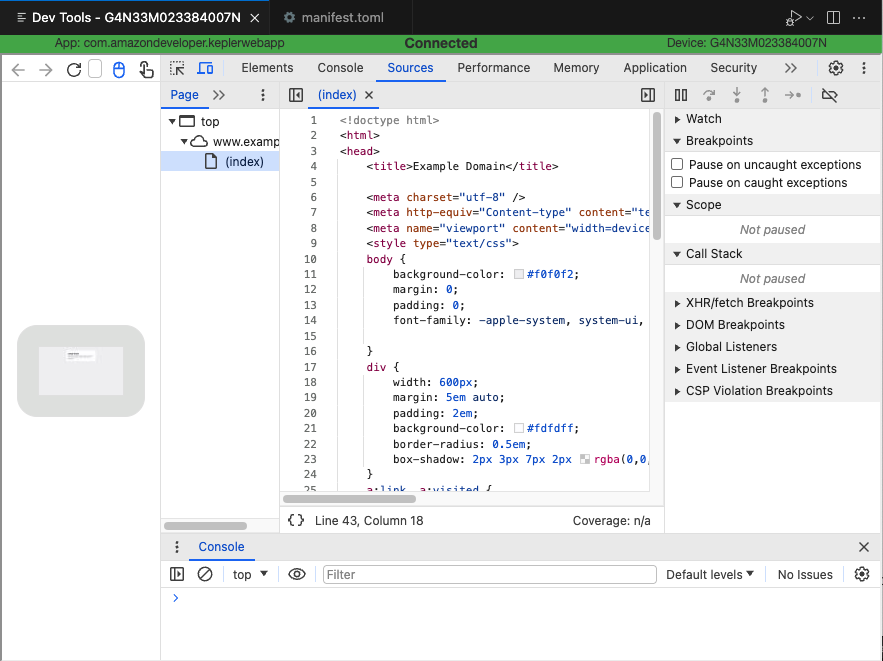
Chrome DevTools appears in the editor and attaches to the WebView runtime. You can inspect HTML and JavaScript source code, as well as set breakpoints in the JavaScript code.
-
Open the Vega Studio side bar and click “Chrome DevTools.”
Related topics
- For more about Chrome DevTools, see Use Chrome DevTools for App Profiling
- Overview of Vega Web Apps
