
Payments for Alexa+
Payments on Alexa+ support your customer's saved payment instruments from your digital wallet, the customer's Amazon wallet, or both.
Understanding payment integration options
Payment integration on Alexa+ follows two primary paths that can be implemented independently, or in combination. The first approach leverages a customer's existing payment instruments stored in your customer's account through OAuth-based account linking. The second approach uses the payment instruments saved in the customer's Amazon wallet.
The most effective strategy for implementing payments on Alexa+ typically combines both partner wallet and Amazon wallet integrations. This provides maximum flexibility and customer coverage while minimizing friction and customer drop-offs.
Note: Amazon does not initiate the charge and is not the merchant of record for any purchases initiated through Alexa+
Partner wallet
If your service enables customers to save payment instruments on their account, those payment instruments can be surfaced to customers for your Alexa+ experience at the time of checkout
Partner wallet workflow
The partner wallet approach requires implementing OAuth 2.0-based account linking. During account linking, customers authorize Alexa+ to access their account information, including saved payment instruments, through a standard OAuth consent flow. This typically occurs once on a mobile device.
After account linking is established, Alexa+ can retrieve tokenized representations of the customer's saved payment instruments (for example, "Visa ending in XXXX") without accessing the actual card numbers. When a customer initiates a transaction, Alexa+ presents these saved payment instruments to the customer. Upon selection, Alexa+ passes the chosen card's identifier to your checkout API. Your backend then handles the actual payment processing using the full card details that are stored in your credit card vault.

Overview
Amazon exposes Alexa+ API contracts through a category-specific Category SDK. Examples of categories include food ordering, home services, ticketing, restaurant reservation, and more. Your payment APIs are mapped to Alexa+ specific checkout API contracts so that Alexa+ can retrieve and use saved payment instruments from the customer's account. The workflow begins with the OAuth handshake to retrieve access and refresh tokens, followed by API calls to retrieve saved payment instruments and ultimately initiate checkout.
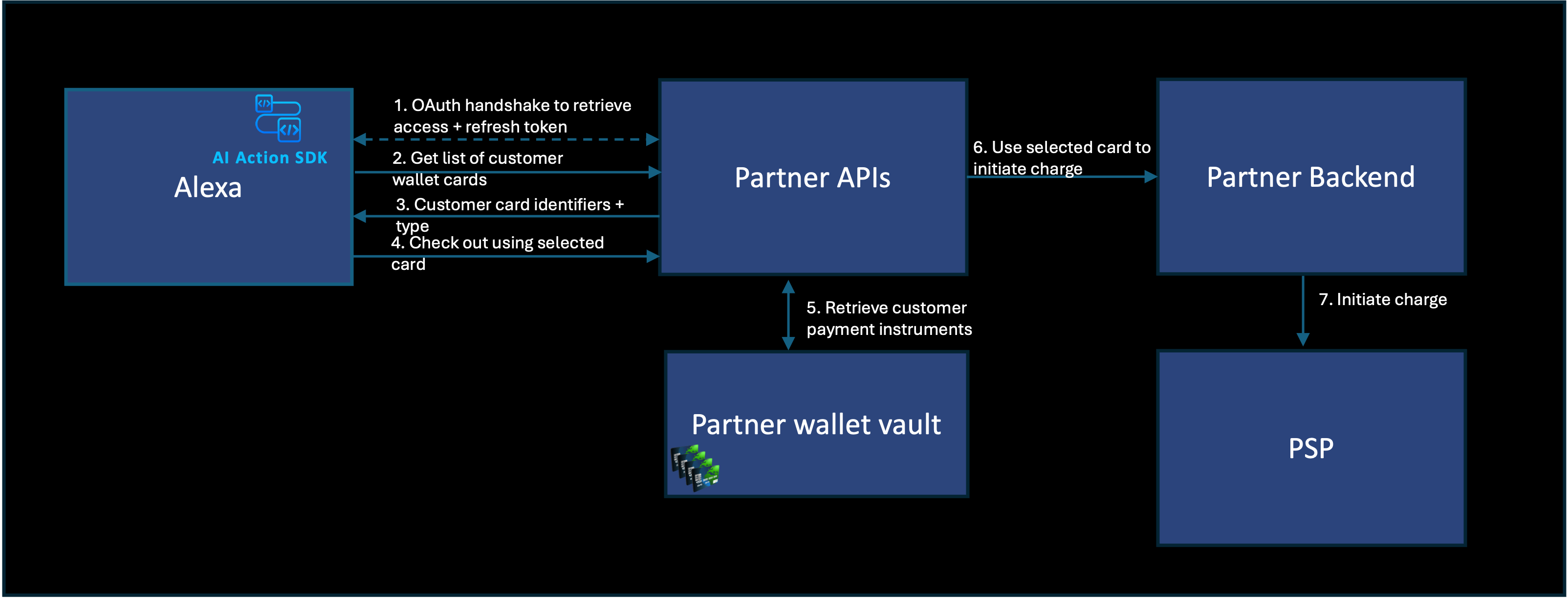
The process starts when a customer triggers a checkout intent through voice. Alexa+ uses the previously established OAuth credentials to make an authenticated request to your API endpoint that returns saved payment instruments. Your API returns a minimal set of card details (typically showing card brand and last four digits), which Alexa+ presents to the customer for selection. After the customer selects a card, Alexa+ calls your checkout API with the selected card identifier. Your backend systems then process the charge through your existing payment processing flows.
This is a low-latency (sub-second) approach. The synchronous nature of this integration provides immediate feedback to customers, resulting in a responsive user experience.
Amazon wallet
Amazon wallet integration uses Amazon's tested payment infrastructure to enable transactions using payment instruments stored in the customer's Amazon wallet.
Amazon wallet workflow
The Amazon wallet approach capitalizes on Amazon's large customer base—over 300 million active customers who make purchases regularly. This ensures that Alexa+ customers already have payment instruments available for checkout without additional setup.
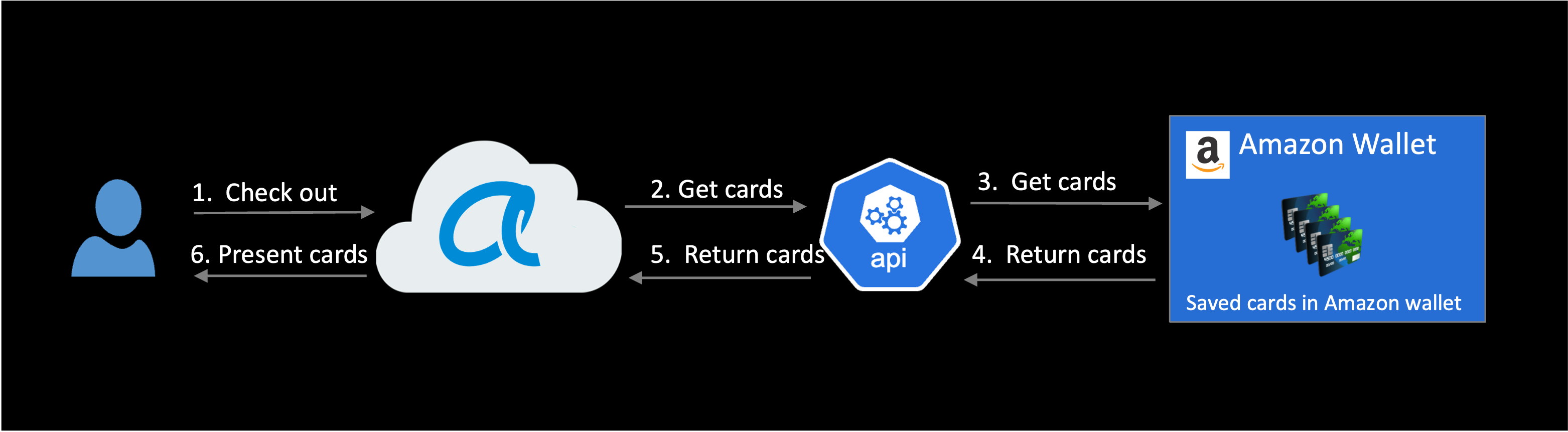
The integration approach works by allowing Alexa+ to access the customer's Amazon-stored payment instruments and use them for transactions with your service. This unlocks acquiring new customers through Alexa+ by eliminating the need for these customers to context switch to a different device simply to create an account and enter payment information during their first interaction with your Alexa+ add-on. This reduces friction and drop-offs.
Amazon wallet customer experience
When customers use your Alexa+ add-on to make a purchase, they see a message to scan a QR code or check notifications in the Alexa app. After permission to access the Amazon Wallet is granted to your Alexa+ add-ons, the flow continues where the customer left off. The default card set in the customer's Amazon account is presented to complete the transaction.

The following technical approaches exist for implementing Amazon wallet integration, each with specific advantages and technical considerations:
Amazon Pay saved wallet
The Amazon Pay saved wallet integration provides a comprehensive solution for accessing Amazon wallet payment instruments. This approach enables your service to surface Amazon wallet payment instruments to customers on Alexa+ and across your web and mobile surfaces.
In this payment integration, when a customer initiates a checkout, Alexa+ retrieves the customer's payment instruments from their Amazon wallet and presents them for selection. Upon selection, Alexa+ generates a ChargePermissionId, a secure token that represents authorization to charge the selected card. This token is passed to your checkout API, which then uses it to initiate the charge through the Amazon Pay API that you need to integrate with. Amazon Pay handles the actual payment processing, including charging the customer's card and managing the settlement process.
This approach supports both customer-initiated and merchant-initiated transactions where the payment instrument is tokenized for future charges. This capability is valuable for scenarios like booking services where authorization occurs first and payment occurs after services are rendered. It's also useful for reservations requiring payment guarantees as a "hold" in case of cancellation or no-shows. The integration provides comprehensive visibility into transactions, including chargebacks and refunds, through Amazon Pay. If you are already using AmazonPay this is the recommended solution.
To get started with Amazon Pay, refer to this getting started guide. Technical details on processing payments with Amazon Pay saved wallet can be found here.
Stripe integration through Amazon Pay
Partners already using Stripe as their Payment Service Provider (PSP) can easily enable Amazon Pay via a toggle on their Stripe dashboard. This approach eliminates the need for a separate Amazon Pay integration, which is required for the Saved Wallet offering.
The workflow resembles the standard Amazon Pay integration, with Stripe serving as the intermediary. When a customer selects an Amazon wallet card for payment, Alexa+ generates a ChargePermissionId that is passed to your checkout API. Your backend then sends this token to Stripe, which communicates with Amazon Pay to retrieve the payment instrument details and process the charge.
This integration provides the same capabilities as direct Amazon Pay integration for Alexa+ based checkouts while allowing you to maintain Stripe as your PSP and existing payment processing flows.
To get started with Amazon Pay through Stripe, refer to this guide and connect with your Stripe Solutions Architect or Account manager for detailed guidance if necessary.
Network tokenization
Network tokenization represents a PSP-agnostic approach to implementing Amazon wallet integration. This method leverages the tokenization capabilities of card networks (Visa, Mastercard, and others) to transmit payment information without requiring a direct relationship with Amazon Pay for payment processing.
The network tokenization integration solution involves exchanging encryption keys between Amazon and your organization. When a customer initiates a checkout and selects an Amazon wallet card, a network-specific token and a cryptogram (a one-time use security code unique to the network token) is requested from the card network. This token and cryptogram are encrypted using your public key and shared with you during checkout. Your systems decrypt the token and cryptogram by using your private key and pass them to your PSP to charge the card through the network.
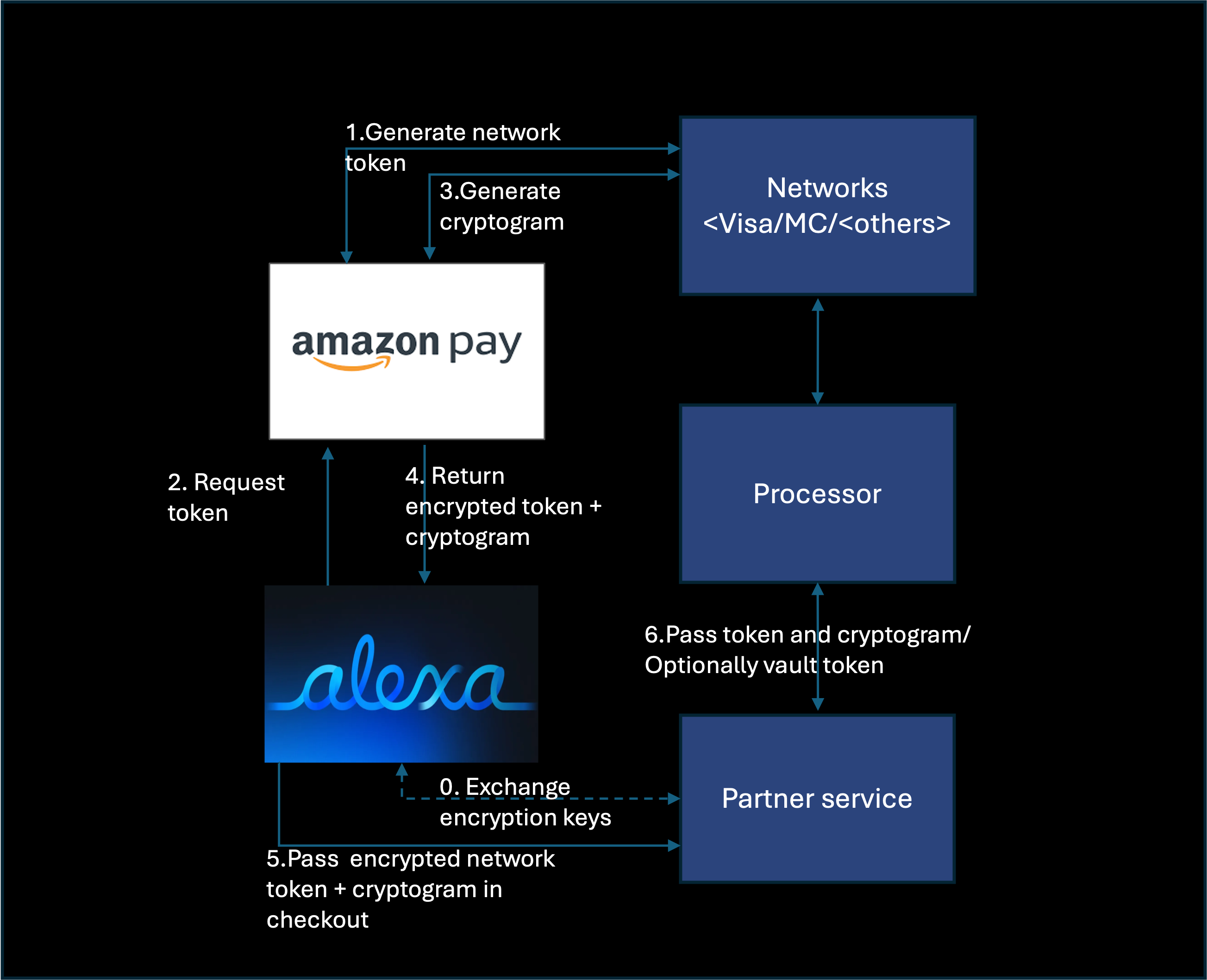
This approach offers significant flexibility as it works with selected PSP that supports network tokens, allowing you to maintain your existing payment relationships and settlements.
Network tokenization supports both customer-initiated and merchant-initiated transactions for future payments. Handling unencrypted network tokens requires your payment processing stack to be Payment Card Industry (PCI) compliant and that you process payments as the merchant of record. Please provide your proof of PCI compliance by completing and providing PCI Data Security Standard Self-Assessment Questionnaire D to your Alexa+ Solutions Architect.
To get started with network tokenization, please engage your Alexa+ Solutions Architect to begin the onboarding process.
Custom payment integration solutions
If you have unique payments integration needs that cannot be accommodated by the afore mentioned solutions, please engage your Alexa+ Solutions Architect to identify a path for integration.
API-based integration
Alexa's API based checkouts are based on an UCP compatible checkout spec. Your
checkout APIs will need to be adapted to support the specific payment insrtument types you will be accepting such as either a ChargePermissionId, a partner wallet instrument identifier (account linking based approach) or a network token depending on your chosen integration method for processing transactions.
The workflow begins when a customer initiates a checkout. Alexa+ retrieves the customer's Amazon wallet payment instruments and presents them for selection. After the customer selects a card, Alexa+ obtains the appropriate token type and sends it to your checkout API. Your backend then processes the payment using this token through the corresponding channel. This synchronous approach provides immediate feedback to the customer with sub-second latencies for card retrieval and checkout completion.
Refer to Implement the Checkout Endpoints for additional details on how to implement this integration path.
Selecting the optimal approach
The ideal solution combines both wallet options to maximize customer coverage and provide flexibility. This dual-wallet approach allows customers who already have accounts with your service to use their stored payment methods while also accommodating new customers acquired through Alexa+ by using their existing Amazon payment instruments. The complementary nature of these approaches minimizes payment friction and checkout drop-off rates while having a positive influence on your top-of-funnel.
Technical implementation considerations
When you implement payment integration for Alexa+, several technical considerations require attention.
Ensure that your OAuth implementation for account linking follows security best practices, including appropriate scope limitations, proper token management, and secure storage of credentials. For API-based integrations, design your endpoints with performance in mind, optimizing for low latency to maintain a responsive customer experience.
Related topics
Last updated: Aug 19, 2026
